Independent, unofficial app for Dockge
dock-g
Dockge in your pocket.
dock-g is an independent, native iOS client for Dockge. Start, stop, and monitor your container stacks on the go — no fiddly browser needed.
 One-time purchase on the App Store · no subscription, no in-app purchases · iPhone & iPad · iOS 26+
dock-g is an independent project by Sven Hanold. It is not affiliated with, developed, endorsed or reviewed by the maintainers of Dockge and Dockge-Enhanced.
What the app does
Stacks under control
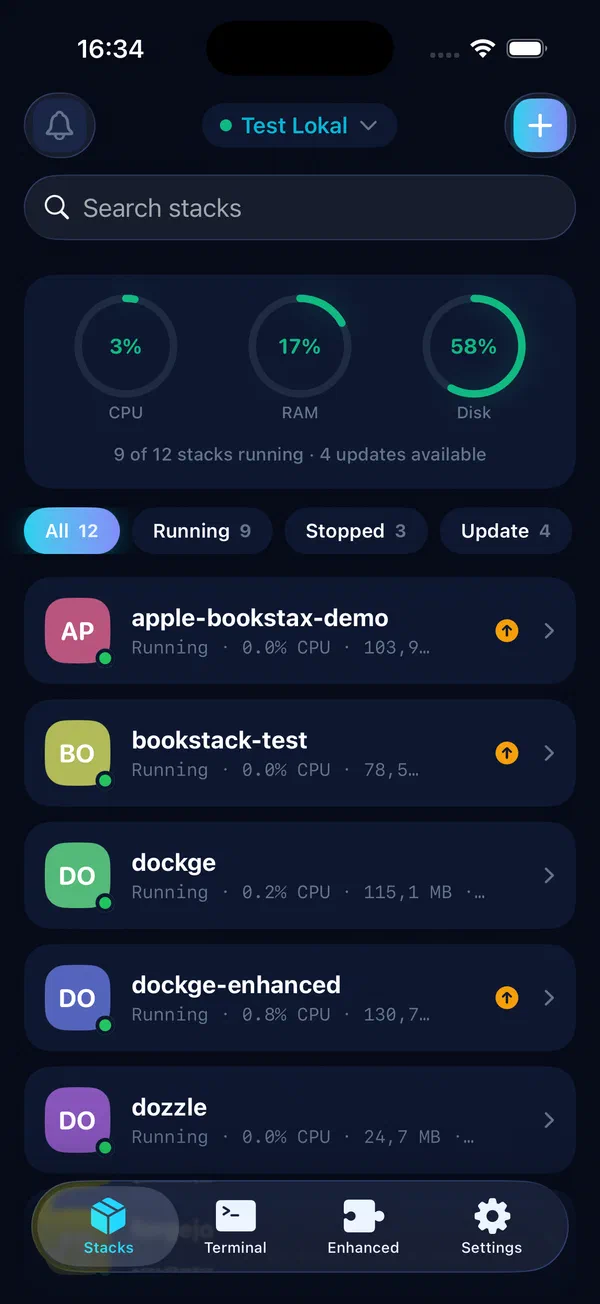
All compose stacks at a glance: status, start, stop, and restart with a single tap.
Learn more →Spot updates
Requires Dockge-EnhancedAn orange pill marks every stack with a pending image update — scheduled or immediate.
Learn more →Live logs & terminal
Real-time container logs right on your iPhone — with search and color highlighting.
Learn more →Multiple servers
Connect any number of Dockge instances and switch between them seamlessly.
Learn more →Notifications
If a stack goes down, you'll know — without opening your laptop.
Learn more →Your data stays yours
Credentials, SSH keys and your docker run command never leave the device. No cloud, no tracking, no accounts.
Learn more →What's new
Hide stacks, clearer errors & validator
- Hide stacks from the list: tuck away folders like “lost+found” with one tap, restore anytime
- Clearer errors: dismissible banners with Retry and Reconnect actions
- Archive is easier to find: explained empty state and an always-visible filter
- Create stack: “Deploy” and “Save Draft” are now clear buttons
- compose.yaml validator with syntax checking right in the editor
- A hint about Dockge-Enhanced for matching servers
- Better accessibility: Dynamic Type and VoiceOver labels
- Connection kept dropping — now stable
- Stopped stacks show a disclosure arrow again
- Filter bar no longer jumps; the active filter is never lost
- “Down” now asks for confirmation
- More reliable splash screen and onboarding
Support
Questions, problems, or an idea for dock-g? Get in touch through our support form.
Replies usually within 1–2 days.
Built on
dock-g is an independent, unofficial client for Dockge and Dockge-Enhanced — with great respect and thanks to the people who develop and maintain these projects.